NEW FEATURES ANNOUNCED AT MICROSOFT IGNITE 2021
Here is our overview of the new and upcoming enhancements for the Dynamics 365 platform. The two most exciting features for us are Context IQ and Microsoft Loop, which will help us ‘stay in the flow of work’, without the necessity to jump from App to App.

Stay 'in the flow of work'
In this video from Microsoft Ignite 2021, Jared Spataro talks about all the enhanced features including Microsoft Loop and Context IQ.
Microsoft Loop included in Teams & Outlook
Microsoft Loop enables data to be surfaced up when you are working in Teams and Outlook, so you stay in the flow of work. This new app combines a powerful and flexible canvas with portable components that move freely and stay in sync across applications. It will be available in preview for Teams, Outlook, and other Microsoft 365 applications in 2022.
So, for example, you can work in Outlook and your business application data is there on your screen, the Dynamics record can be seen as an Information card, which displays a preview, so you can view information in the flow of work. This card can also be updated without leaving Outlook.
Data will still be controlled by security and permissions but multiple people can work on the data at the same time. You will also be able to see colleagues who are logged in and working on the same project, so collaborating with them is simplified.
Microsoft are really putting the user experience first, by putting the data where you are working rather than having to move between Apps.
Microsoft Loop
See how the new Microsoft Loop can improve your workstream.
CONTEXT IQ ADDED TO DYNAMICS 365 & OFFICE 365
Dynamics 365 and Office 365 will have the added benefit of Context IQ which will revolutionise how, when and where people work. In a world where hybrid working, is the new normal, we need increasingly simple ways to connect and collaborate and Context IQ will help achieve this effectively from our Dynamics 365 & Office 365 dashboards.
Simply put Context IQ capabilities for Microsoft Dynamics 365 and Microsoft 365, will surface the right information, whether it is from documentation, other colleagues, or from Teams and Outlook, in the flow of work – so we become hyper-connected on our dashboards.
Teams and Outlook, in the flow of work
Teams and Outlook, in the flow of work, embedded on your Dynamics 365 dashboard.
Here are the enhanced features you will be able to utilise on your Dynamics 365 and Office 365 dashboards soon:
Teams chat embedded in the Dynamics 365 dashboard
Teams chat in your Dynamics 365 dashboard is now available in preview for Dynamics 365 Sales, Dynamics 365 Customer Service, and Dynamics 365 Field Service.
Working directly from your Dynamics 365 dashboard Context IQ can be used to link chats to sales opportunities or service records, so all of your team are on the same page. Context IQ can also suggest colleagues who are on-line, and available to collaborate, so you can start a Teams chat without having to switch Apps, keeping you in the flow of work.
Surface key sales information in a Teams meeting
Surface key sales information directly from Dynamics 365 in a Teams meeting, without having to change Apps will be available for preview in early 2022.
Advanced reporting from Teams meetings:
- Making the notes captured by employees automatically attach to the timeline of the record.
- Conversation Intelligence can be leveraged so that users can uncover highlights from meetings to follow-up on.

Teams meeting
Surface key sales information directly from Dynamics 365 in a Teams meeting.
Dynamics 365 Sales – Digital voice and Conversation Intelligence
Microsoft recognise Sales professionals spend a lot of time engaging with customers, either on digital calls or in online meetings, so now sellers will be able to work from their Dynamics 365 Sales dashboard and with one click:
- Conduct and answer calls
- Join online meetings
- Receive and answer emails
This feature will be available in preview for Dynamics 365 Sales.
The integrated Teams dialer or third party telephony vendors can be used from a desktop, laptop, or mobile device for outbound and inbound calls.
Conversation Intelligence
Conversation Intelligence is a transcription feature, that will not only transcribe your calls, but will also analyse the content. This is useful for sentiment, which can be seen on your dashboard, so sellers can adjust their pitch based on customers sentiments. It can also flag up keywords and prospect information, and can also be useful for managers to help coaching.
Dynamics 365 – Live copresence
Often, when we are working on a Dynamics 365 record, and we need new insight. Hovering over the profile of the Dynamics record will now bring up a Profile card to tell you who else has/is working on this record, so you can quickly collaborate with them in the flow of work.
Now available for preview in Dynamics 365 Marketing, Dynamics 365 Sales, Dynamics 365 Customer Service, and Dynamics 365 Field Service.
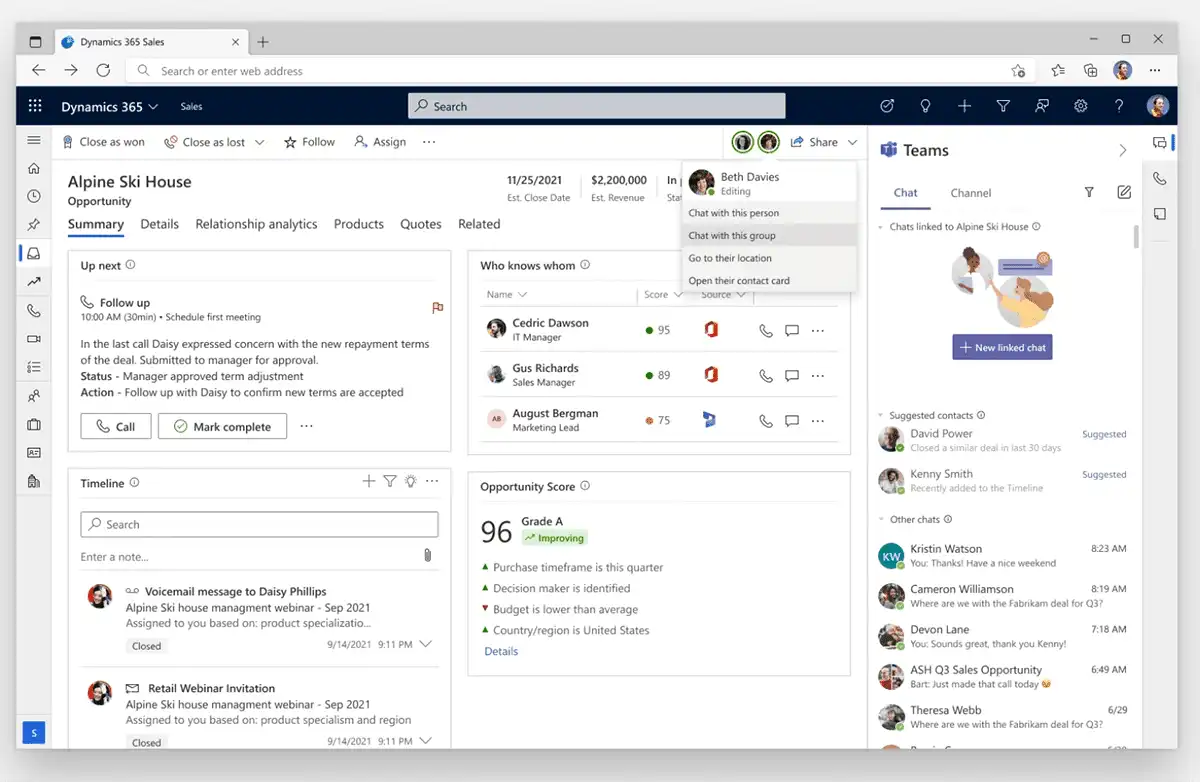
Profile card
Hovering over the profile of the Dynamics record will now bring up a Profile card.
Dynamics 365 – No more switching Apps
Get results by searching all of your data in Microsoft Dataverse. See image below for an example, you can search for a Dynamics 365 customer record from Bing and the search bar in Teams, SharePoint, and Office. Dynamics 365 settings for roles and permissions ensure users only see records for which they are granted access.
In preview now for SharePoint, Bing, and Office. Preview for Microsoft Teams to follow in 2022.

Search for a Dynamics 365 customer record
You can search for a Dynamics 365 customer record from Bing and the search bar in Teams, SharePoint, and Office.
Dynamics 365 – @mention
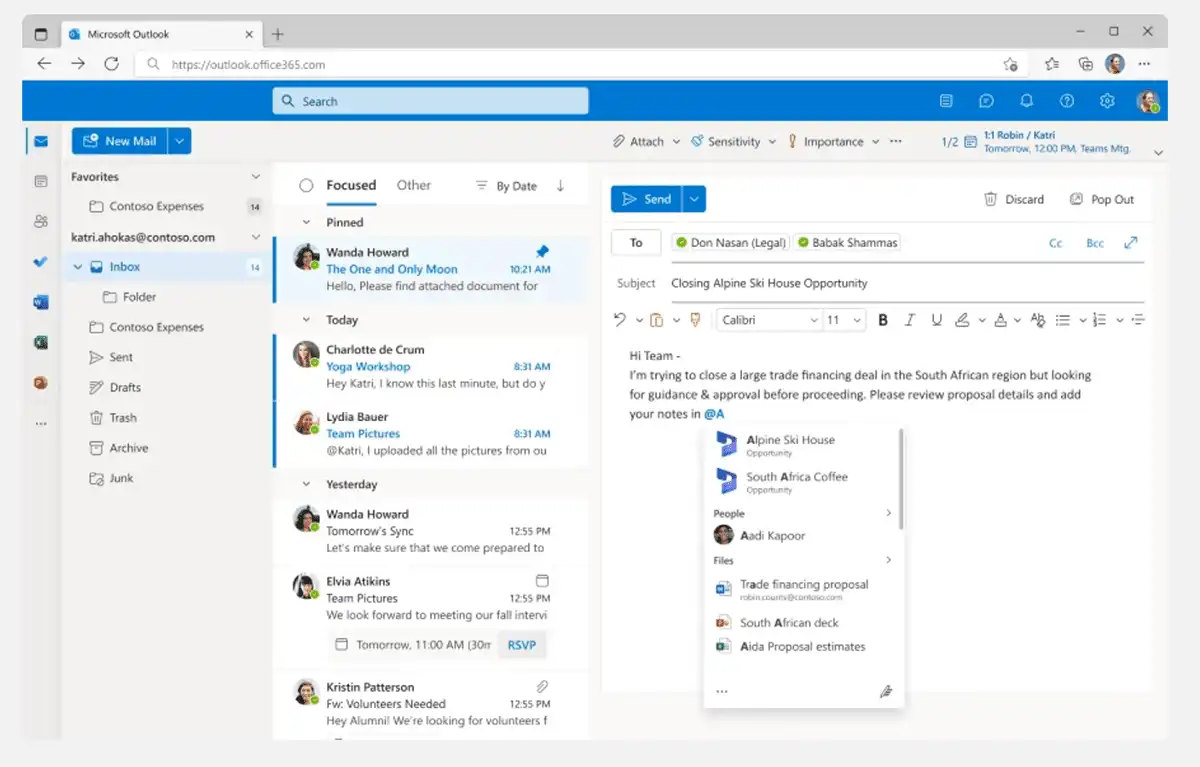
Use @mention to find a record, in the flow of work in Outlook or Teams message, and to tag someone for feedback. Soon, you will also be able to use @mention a Dynamics 365 record to quickly share it inline.
Available in preview for Teams, Outlook, and other Microsoft 365 applications in 2022.
Dynamics 365 - @mention
Use @mention to find a record, in the flow of work in Outlook or Teams message.
Dynamics 365 – Information card
Share a link to any Dynamics 365 record, and at that point you can choose to show an information card that displays a preview. Recipients can view and edit the details in the flow of work.
Power BI App
Having the Power BI App in the Teams dashboard, will drive your data culture, with colleagues working directly from this data hub, which has the up-to-date metrics and configured data sets.
Data is produced by everyone in your organisation, across every activity they complete. Using all this data proactively can be achieved with the Power BI App, as the data display is simple and approachable for every skill level. Users can then bring the most relevant data to their team.
Automatic installation will be standard for new users in November 2021 with Active users following on later
Power BI App
Power BI can help you drive a data culture and customers large and small are standardizing on Power BI. You will see how AI automatically finds patterns in your data.
Microsoft Power Virtual Agents
Microsoft Power Virtual Agents enables businesses to have more proactive Chat Bots. Pre-set conditions, answers, and support group interactions, can be included in channel conversations.
Microsoft Power Virtual Agents
In this video, learn how Power Virtual Agents (PVA), integrated in Microsoft Power Platform, can be used anywhere for customer service.
Further reading from Ignite 2021:
Teams
The core capabilities of Teams have been enhanced which can be seen in our Teams for your Team blog with video examples. The emphasis from Microsoft here, is to make teams the new front end.
Power Apps
Pay-as-you-go Licensing for Power Apps, provides a new level of flexibility for SMBs. Read more about this in our blog.
SHARE POST
TECHNOLOGY CAN RULE YOU OR BE YOUR TOOL
Find out more about your digital CRM solution today.
For further information book a call
Or call us now