POWER APPS
In an ever more competitive world, businesses are looking for immediate ROI, and this innovative low code, no code application development platform pays for itself, as the Power Apps that make up your CRM, can do so much more than just collecting data.
Power Apps that make up your CRM
The Power Apps break down silos and connect all, so your business systems and databases, including any sector specific web databases, data can all be seen – so you gain a 360-degree view. They enable you and your employees to work smarter, eliminating bottle-necks and repetitive processes across all departments.
CHECK OUT THE NEW pay-as-you-go billing, which has just been announced at Microsoft Ignite, November 2021, which will benefit SMBs.
Power Apps overview
In this video, learn how you can quickly build and share low-code apps with Microsoft Power Apps.
What can I do with Power Apps?
Take a minute to think about your business and the work that your team does day to day, are there any time-consuming, error prone tasks? Are you still using paper for documentation? Do you have a disconnect between your email, and your CRM?
The list below shows the kinds of issues that can be solved by a power app:
Availability
Accessing apps at anytime, anywhere.
Mobility
Allowing people to work with an app while on the move
Consolidation
Gathering data in a more automated way to minimize manual consolidation
Training
Getting people up to speed and tracking their training results and certifications
Democratization
Enhancing the ability to self-solve problems within the department or section
Inclusion
Reducing friction for employees who have different work environments from other employees, such as remote workers or people with disabilities
Efficiency
Reducing time required to get the desired outcome, reducing unnecessary steps
Productivity
Increasing the throughput of a process
Timeliness
Increasing the speed of end-to-end collaboration among different stakeholders
Scalability
Allowing more throughput
Analysis
Gathering required additional information, storing it in such a way that allows for easier analysis
Reporting
Enabling faster or more complete reporting to management
Security
Securely storing and working with data
Compliance
Solving issues around handling personal information, meeting legal or accounting requirements
Sustainability
Reducing waste (such as paper and electricity) and pollution
3 types of Power App
Power Apps are split into three categories: Canvas, model driven and portal. They are all part of the Microsoft Power Platform and sit alongside Power bi, Power Automate and Power Virtual Agents. The Microsoft Power Platform suite of tools allows citizen developers, who aren’t traditional developers, to solve business problems in a low code, no code way, the reason for this is that it is far cheaper and you won’t be tied to that developer for the consequential updates. The Power platform benefits from twice yearly updates, which are sent remotely from Microsoft, meaning you do not incur any downtime.
Overview of the three Power Apps
CANVAS APPS – MOBILITY
These are business apps which will look similar to the Apps you see in the App Store, but they are populated by the data from your Dynamics 365 CRM, spreadsheets, or other external data sources, and they enable mobility and can be viewed on your Power BI dashboard across all devices e.g. Phone, tablet, and laptop.
Power Apps have connectors for many popular services and on-premises data sources, including SharePoint, SQL Server, SAP, Oracle, Workday, Office 365, Salesforce, and Twitter. These apps are called ‘canvas’ as your consultant will start with a canvas and create them by drag and drop. Canvas Apps can perform business formulas and tasks, like you would on an Excel spreadsheet.

Canvas app for vehicle engineers
Canvas app for troubleshooting and reporting faults.
Note: If you want to bring external sourced data into the Model Driven App interface, Canvas Apps are a good way of doing this. So, for example, if you need to see your Twitter feed as part of your business, on your Dynamics 365 power BI dashboard, then embedding your Canvas app, which has Twitter enabled, will facilitate this.
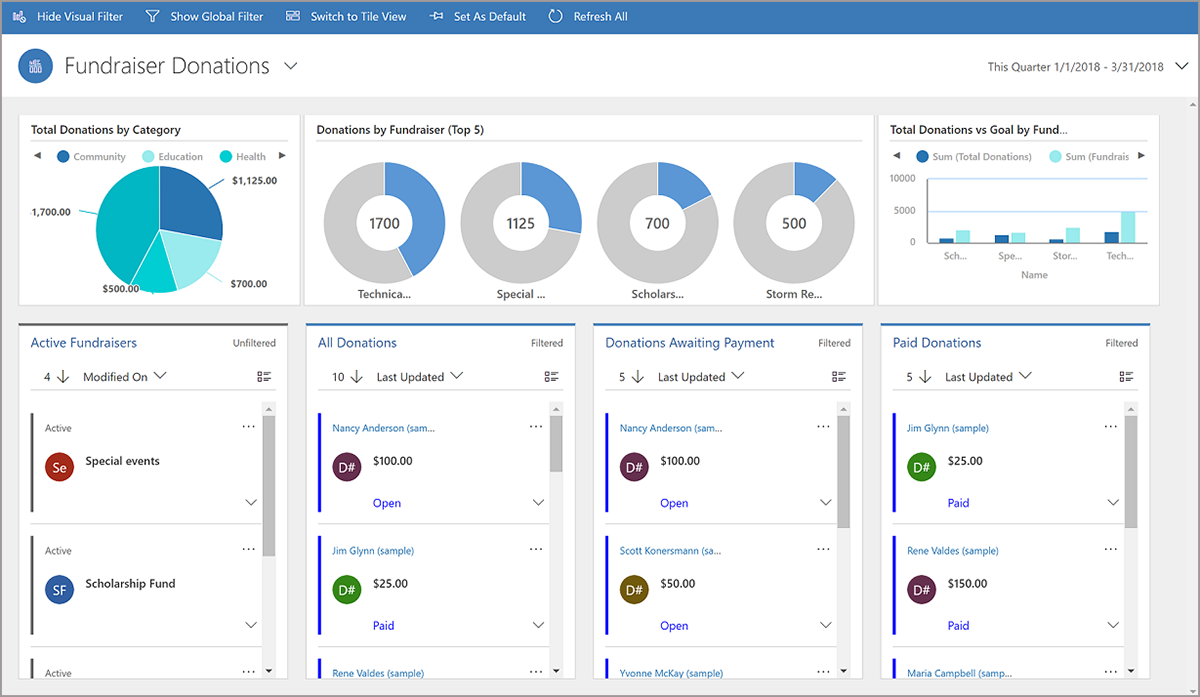
Model driven app
Power Bi dashboard showing charity fundraising data from a model driven app.
MODEL DRIVEN APPS – PROBLEM SOLVING
Model Driven Apps are comparable to a CRM system or any kind of database that you would purchase for a company, but the significant difference is that you are not getting an ‘off the shelf’ solution which is ‘one size fits all’ because the Power Platform is based on Apps meaning it can also flex – so you get a tailor-made solution. Microsoft recognises that no two businesses are alike, so they have created verticals that are sector specific, to give you the entities you need, but the App format means that there is huge flexibility.
PORTAL APP – CUSTOMER FACING
Portal Apps can be created when you want to have customers interact directly with data in your CRM. They can be skinned to look like a website page, but will have direct and secure access. So, for example, if a customer wants to update their address, they can do this and it will update directly on your CRM.
Customers will only see the information you want them to see, and can only alter this information if you set-up the ‘access based’ permissions. Note: These apps are built in the Microsoft dataverse so you cannot use the portal functionality on any external database systems.

Canvas App for holiday booking
Canvas Apps can be skinned to look your website, but enable direct and secure access to your CRM data. In this case booking details will be compiled in CRM.

Portal App for community project
Customers can directly update their own data, such as, contact details, directly on your CRM.
NEXT LEVEL APP USES – IOT
Adding advanced functionality to your apps is simple. These can include aspects like: AI and analytics for chat bots, interactive maps, external portals, mixed reality, IOT and more.
There's an App for that....
Corporate Vice President James Philips talks about unleashing innovation using the Power platform Apps.
How quickly do you need your app?
Apps are a robust solution, and benefit from rapid deployment, which is not dependent on the source of the data. Because Model driven power apps are comprised of metadata, which simply means “data about data.” We add predetermined rules to your data, so you can achieve better and easier comprehend analytical results.
- Customer Relationship Management Systems (CRM)
- Human Resources Information Systems (HRIS)
- Inventory Management System
- Employee Onboarding System
We can rapidly create model-driven apps as much of the layout is pre-defined and primarily designated by the components. The skill is determining the appropriate data for your app to streamline and how this will relate to other data.
Below are the stages that we use, so you can see that you are in the driving seat:
Plan
Identify the who, what, when, and why.
Design
Model the data (decide how the data you need and create will be organized, accessed, and stored) and sketch out the app screens.
Make
Create the app.
Test
Have users try the app.
Deploy & define
Get your app into the hands of users, get feedback, and decide what to change or add.
Inturi are here to help you with the ‘who, what, when, and why’, so do give us a call if you have bottle-necks and pinch points in your business processes that could potentially be automated. We will help you to scope your business and if you decide to go ahead, we will give you a comprehensive break-down of what can be achieved and the costs involved. Most people are surprised at the price and how quickly they will reach ROI.
Pay-as-you-go
Check out the new billing, which has just been announced at Microsoft Ignite, November 2021, which will benefit SMBs.
Call today
AZURE Functions
Also see our BPA Business process automation blog to see this example achieved with Azure functions: we took a manual process that took 3-5 days, which cost £500 in labor costs, and reduced this to 3 minutes, costing 10p p/m.