Microsoft Dynamics 365 - Field Service
The Field Service app provides a complete solution from Sales Management to Contract, Work Orders, Case Management, state of the art scheduling board to a configurable mobile field service app.
Key Features
- Sales & Quote Management
- Contract Management
- Automatic Work Order Generation
- Case Management
- Asset Management
- Functional Asset Locations
Sales & Quote Management
Contract Management
Automatic Work Order Generation
Case Management
Asset Management
Functional Asset Locations
- Interactive Schedule Board
- Scheduling Assistance
- Travel Time and Distance
- Utilisation reporting
- Timesheet & Time off requests
- Bookable Resources and Resource Characteristics
- Customer Self Booking Portal
Interactive Schedule Board
Scheduling Assistance
Travel Time and Distance
Utilisation reporting
Timesheet & Time off requests
Bookable Resources and Resource Characteristics
Customer Self Booking Portal
read more about Field Service here: Overview of Dynamics 365 Field Service (contains video) | Microsoft Learn
Schedule Board
See all bookings at a glance and use the interactive schedule board to drag and drop your work orders.

Scheduling Calendar
- A semi-automated scheduling assistant helps assign work orders based on closest location and resource characteristics.
- See at a glance resource availability with travel time and distance from up coming jobs
A semi-automated scheduling assistant helps assign work orders based on closest location and resource characteristics.
See at a glance resource availability with travel time and distance from up coming jobs
Resource Insights
- Skills Categorisation
- Roles
- Experience levels
- Resource images
Skills Categorisation
Roles
Experience levels
Resource images

Mobile App

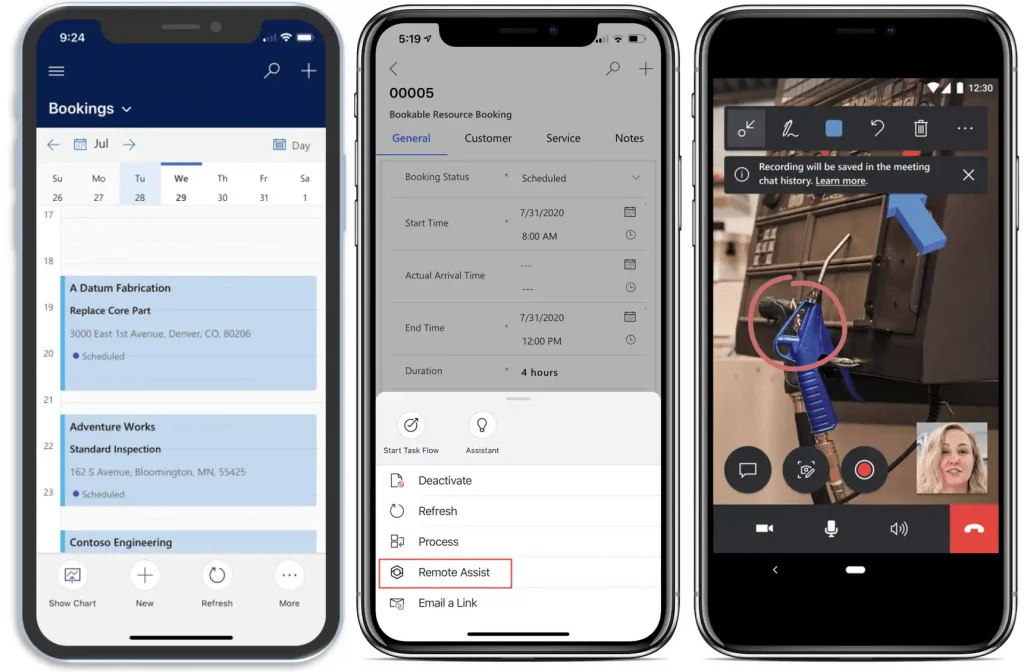
See your bookings
- The Booking calendar provides a complete view of bookings for the day / coming weeks.
- Change the Booking Status to ‘Traveling’ to track travel time and calculate distance.
- Get directions using the map function.
The Booking calendar provides a complete view of bookings for the day / coming weeks.
Change the Booking Status to ‘Traveling’ to track travel time and calculate distance.
Get directions using the map function.
Carry out Service Tasks
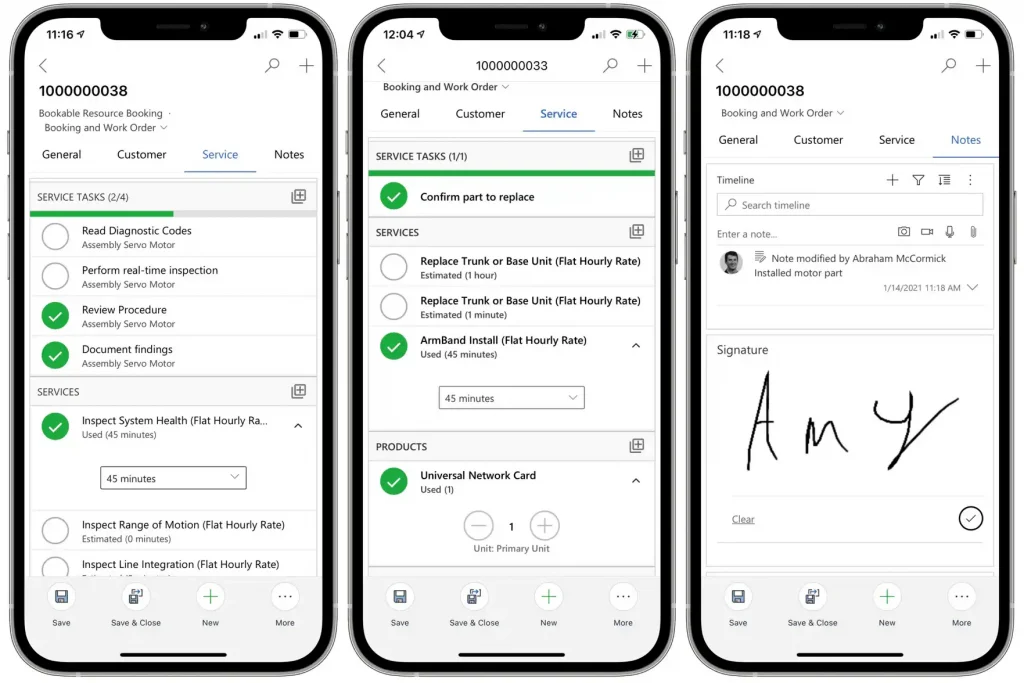
The service area contains a list of tasks that need to be carried out during the booking.
Each Service Task can be configured based on the type of service activity and can be configured to capture form type information which can then be output to the customer.
Record time taken for each task and record products used which will feed back to the work order for billing.
Capture customers signature for invoice generation.
The service area contains a list of tasks that need to be carried out during the booking.
Each Service Task can be configured based on the type of service activity and can be configured to capture form type information which can then be output to the customer.
Record time taken for each task and record products used which will feed back to the work order for billing.
Capture customers signature for invoice generation.
Remote Assist
- Call for help using the Remote Assist feature
- Start a 2 way video call with colleagues to help progress tricky tasks.
- Create follow up work orders if additional work required.
Call for help using the Remote Assist feature
Start a 2 way video call with colleagues to help progress tricky tasks.
Create follow up work orders if additional work required.
read more about Field Service here: Use the Field Service (Dynamics 365) mobile app (contains video) | Microsoft Learn
What to know more!
Here’s some resources you may find useful: